Documentation
Add a roxygen block just above your function definition
Put your cursor inside the function’s name (e.g. lib_summary) and a light bulb appears, offering to “Show Code Actions”. Click it and choose “Generate a roxygen template”.
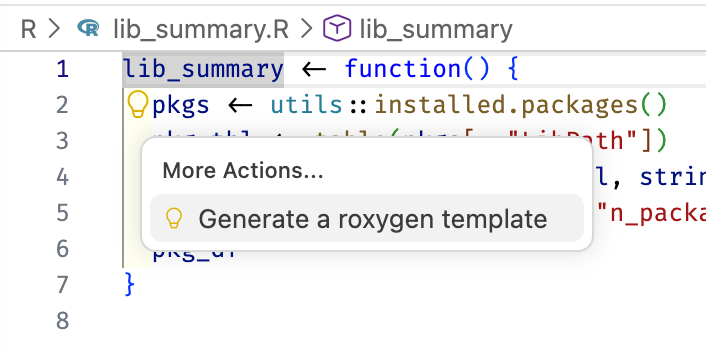
#' R Library Summary
#'
#' Provides a brief summary of the package libraries on your machine
#'
#' @returns A `data.frame` containing the count of packages in each of the
#'   user's libraries
#' @export
#'
#' @examples
#' lib_summary()
lib_summary <- function() {
  ...
}
Build documentation from roxygen comments
document()document() keyboard shortcut
Positron also exposes this from the Command Palette as R: Document R Package, with the keyboard shortcut Cmd/Ctrl + Shift + D.
Every time you edit a roxygen comment, you need to run document() before the change shows up in the rendered help.
You can preview the docs with ?function_name
load_all()

?lib_summary
Check package again
- R: Check R Package from Positron Command Palette or
- Cmd/Ctrl + Shift + E or
check()in R console (the command / keyboard shortcut is better, though)
Create package-level documentation
use_package_doc()

document()
Preview it:
?libminerThen check the package again, using the Command Palette or the keyboard shortcut.
Install your package
- R: Install R Package and Restart R from Positron Command Palette or
- Cmd/Ctrl + Shift + B or
install()in R console (the command / keyboard shortcut is better, though)
library(libminer)

lib_summary() # note one more package than before - that's yours!
README
use_readme_rmd()Creates README.Rmd for your package and opens it for editing.
Fill in the goal, adjust the example, and delete the boilerplate about cars and pressure, to end up with something like this:
---
output: github_document
---

<!-- README.md is generated from README.Rmd. Please edit that file -->

```{r, include = FALSE}
knitr::opts_chunk$set(
  collapse = TRUE,
  comment = "#>",
  fig.path = "man/figures/README-",
  out.width = "100%"
)
```

# libminer

<!-- badges: start -->
<!-- badges: end -->

The goal of libminer is to provide an overview of your R library setup. It is a toy
package created as a part of a workshop and not meant for serious use.

## Installation

You can install the development version of libminer from [GitHub](https://github.com/) with:

``` r
# install.packages("pak")
pak::pak("jennybc/libminer")
```

## Example usage

To get a count of installed packages in each of your library locations,
optionally with the total sizes, use the `lib_summary()` function:

```{r example}
library(libminer)
lib_summary()
# specify `sizes = TRUE` to calculate the total size on disk of your packages
lib_summary(sizes = TRUE)
```
You still need to render that to README.md and build_readme() makes sure to render with respect to the current source of your in-development package, for consistency.
build_readme()Check package again
- R: Check R Package from Positron Command Palette or
- Cmd/Ctrl + Shift + E or
check()in R console (the command / keyboard shortcut is better, though)