Introduction to R package development
The Whole Game
Setup
How to follow along
- These slides are available on the workshop website.
- Workshop website also has one page per module:
- Use this to copy / paste content
- See exact devtools/usethis functions
- Questions, links, and getting unstuck: the #pkg-dev channel in the RaukR Slack
- Deeper reading: R Packages (2e), especially The Whole Game
Tools
- R, ideally the current release
- Positron
- A package development toolchain (Rtools, Xcode CLI tools,
r-base-dev) - The devtools package
Git and GitHub are optional but strongly recommended.
Installing R
I recommend rig, the R Installation Manager:
rig add releaseIt handles the fiddly parts, steers you into best practices, and lets you keep several versions of R side by side.
Installing packages
devtools is a meta-package, so usethis, roxygen2, testthat, and pkgdown all come along.
I personally use pak for all package management:
Situation reports
Is my system ready to develop packages?
Do R, Git, and GitHub understand each other?
You want a name, an email, and a PAT reported as <discovered>.
Why Positron?
Everything here works in RStudio too. The commands are all devtools and usethis calls, which are IDE-agnostic.
But we will lean on Positron’s package development affordances, which live in the Command Palette and behind keyboard shortcuts.
Overview
Why make a package?
- Easier to reuse the functions you write
- A consistent framework that nudges you to organize, document, and test
- That framework unlocks a lot of standardized tooling
- The easiest way to distribute code, to your team or to the world
Let’s make a package together
We will:
- Create a small package from scratch
- Use Git to track our changes
- Push the code to GitHub
- Write documentation
- Write tests
- Take on a dependency
- Set up automated checks and a website
We won’t
- Talk much about writing and designing functions
- Talk about shipping data in your package (possible, and often useful)
- Go deep on any one topic
Half a day is enough for the whole game, once. Depth comes later.
Our end goal
libminer, a toy package that tells you about your R libraries.
- Jenny’s libminer from 2025: https://github.com/jennybc/libminer-raukr-2025
- Jenny’s libminer from 2026: PLACEHOLDER, we make it live today
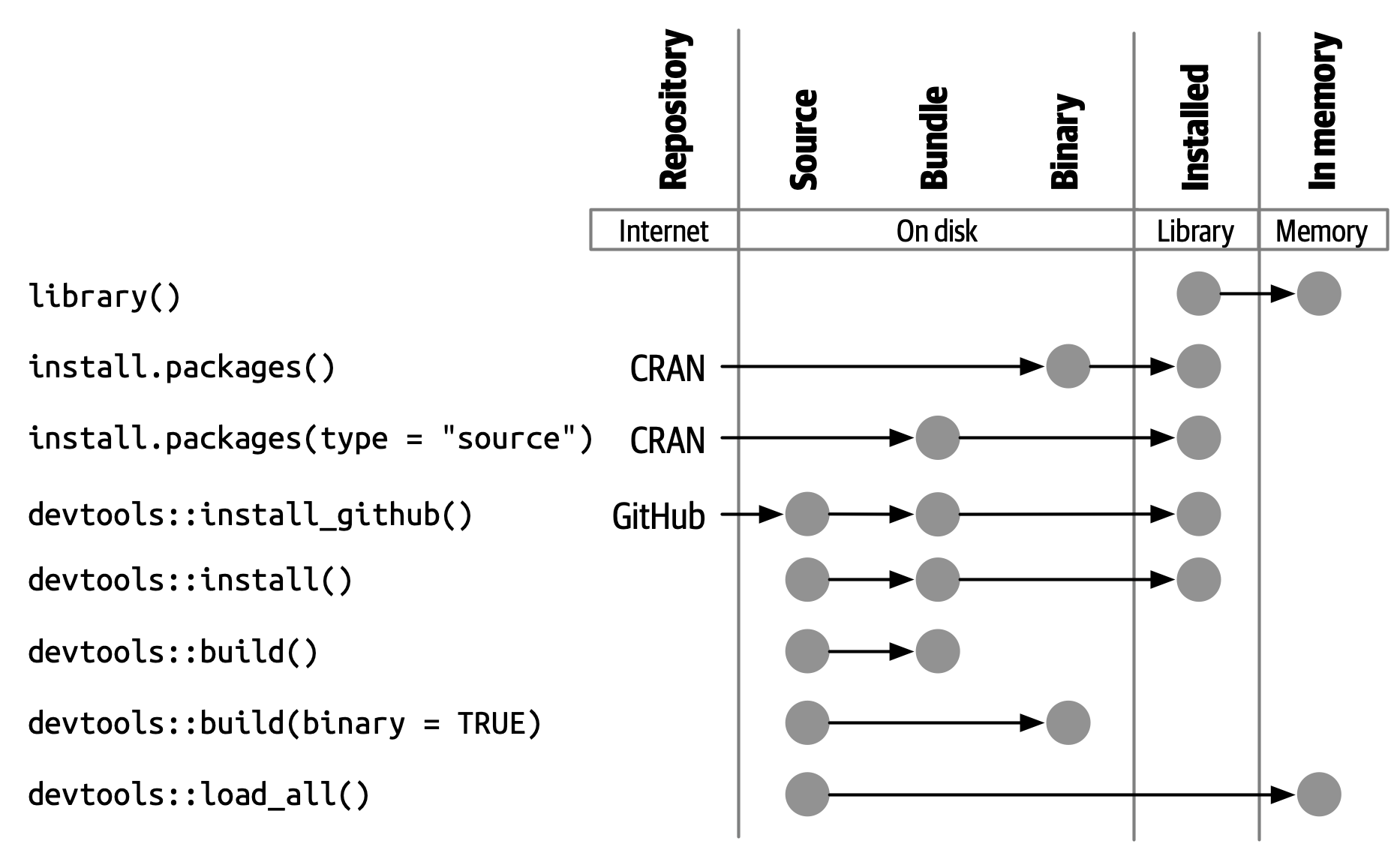
Five forms of a package
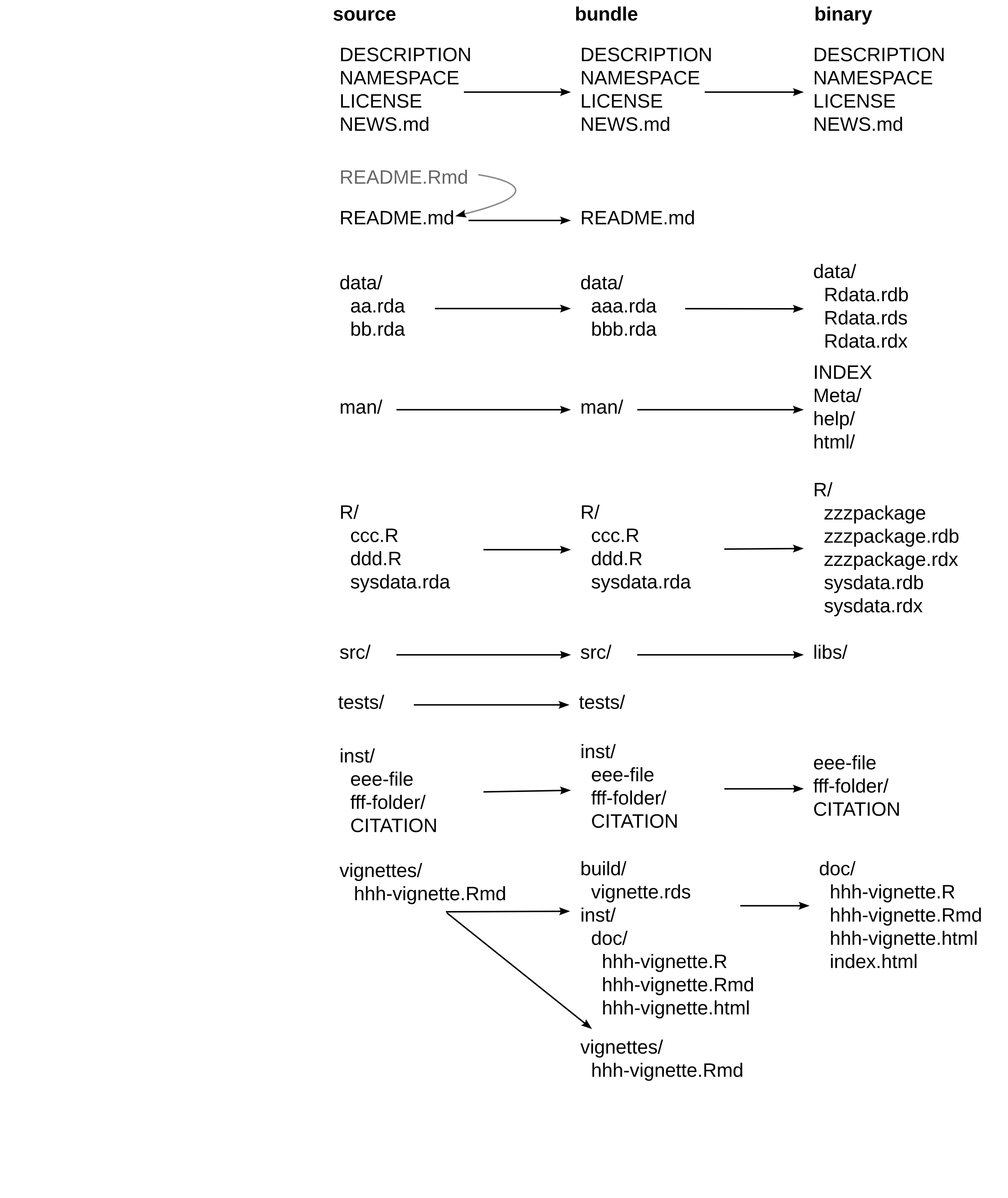
A package in “source” form
Create a package
Libraries: where packages live
- A library is a directory containing installed packages
- You have at least one, and commonly two:
- a system library, with the base and recommended packages
- a user library, with everything you installed
library(pkg)attaches a package from a library
Where do your packages live?
That is the raw material for the package we are about to build.
Load devtools
- Attaches usethis as well, which is the source of most functions we will use
- Update it if it is old
create_package()
Pick a location that makes sense to you. Not inside another package or Git repo!
What you get
libminer
├── .Rbuildignore
├── DESCRIPTION
├── NAMESPACE
├── R
└── libminer.Rproj- A directory with the basic package skeleton
- Opened as a new project in Positron
use_git()
- Turns the package directory into a Git repository
- Offers to commit the files
- Offers to restart
use_github()
Creates a GitHub repo and pushes your package to it.
Prerequisites: a GitHub account, and credentials that work. That is what git_sitrep() was for.
use_devtools()
Adds a line to your .Rprofile so devtools is attached in every interactive session. Paste, save, restart R.
Skip it if you prefer, then just call library(devtools) after each restart.
Your turn
- Create your package with
create_package() - Poke around the files it made
- Run
use_git(), thenuse_github() - Run
use_devtools()and restart R
use_r()
- Your R code goes in
R/ - Name the file after the function it defines
- Put the function definition, and only the definition, in the file
Write your first function
How do you test drive it?
Tempting, but no:
source("R/lib_summary.R")Send the function definition to R console with keyboard shortcut
Do this instead:
load_all()
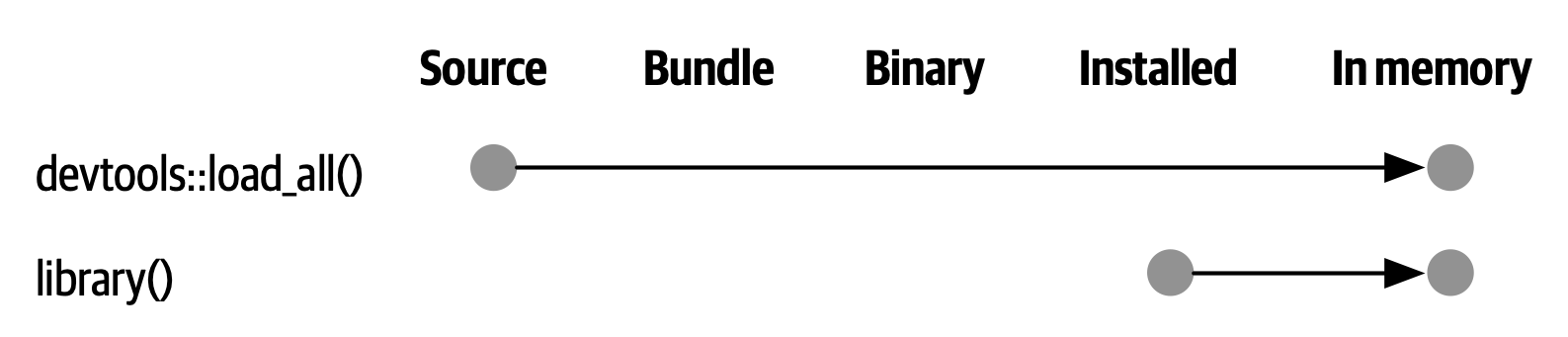
Simulates building, installing, and attaching your package.
- Makes all your package’s functions available immediately
- Fast iteration: edit, load, run
- A good approximation of how users will meet your package
Workflow: edit, load, run
load_all() is the single most common thing you do.
- R: Load R Package in the Command Palette
- Cmd/Ctrl + Shift + L
Worth committing to muscle memory.
Your turn
use_r("lib_summary")- Write
lib_summary()in that file load_all(), then calllib_summary()- Commit your changes
check()
Runs R CMD check, the official checker, from within R.
- R: Check R Package in the Command Palette
- Cmd/Ctrl + Shift + E
- or
check()in the console (the command / keyboard shortcut is better, tho)
Check early, check often. “If it hurts, do it more often.”
Three kinds of message
- ERROR: severe problems, always fix
- WARNING: fix them, and you must fix them for CRAN
- NOTE: mild problems, or sometimes just an observation
For CRAN, try to get to zero of all three.
The DESCRIPTION file
Your package’s metadata. Edit along these lines:
Package: libminer
Title: Explore Your R Libraries
Version: 0.0.0.9000
Authors@R:
    person("Jane", "Doe",
           email = "jane.doe@something.com",
           role = c("aut", "cre"),
           comment = c(ORCID = "XXXX-XXXX-XXXX-XXXX"))
Description: Provides functions for learning about your R libraries, and the
    packages you have installed.
DESCRIPTION details
- Every package must have one. It is the defining feature
- Machine readable, with fussy formatting (Debian Control Format)
Title: one line, title case, no full stopDescription: full sentences, ends with a full stop, does not start with “A package for”Authors@Ris unusual: it holds executable R code
Licenses
use_*_license()
- Permissive: MIT (simple), Apache 2.0 (MIT plus patent protection)
- Copyleft: GPL, AGPL, LGPL. Improvements must be shared
- Creative Commons: good for data packages. CC0, CC-BY
use_mit_license()
✔ Adding 'MIT + file LICENSE' to License
✔ Writing 'LICENSE'
✔ Writing 'LICENSE.md'
✔ Adding '^LICENSE\.md$' to '.Rbuildignore'
Then check again.
Your turn
check()and read the output- Fill in
DESCRIPTIONwith your own details use_mit_license()check()again, then commit and push
Documentation
man/*.Rd
Help files live in man/ and are written in an Rd markup language.
You will not write them by hand. You write roxygen comments next to your code, and roxygen2 generates the .Rd files.
roxygen2
Special comments starting with #' above a function definition:
- Title and description
@paramfor each argument@returnsfor the return value@exportto make it public@examplesfor usage
Documentation lives with the code.
Generating a skeleton in Positron
- Put your cursor in the function’s name
- A light bulb appears, offering “Show Code Actions”
- Choose Generate a roxygen template
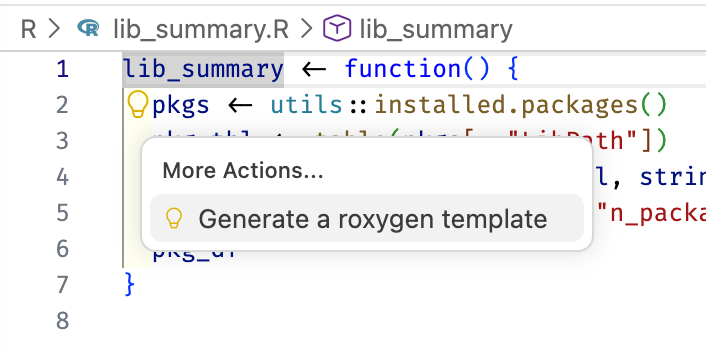
A roxygen block
document()
Turns roxygen comments into man/*.Rd and updates NAMESPACE.
- R: Document R Package in the Command Palette
- Cmd/Ctrl + Shift + D
- or
document()in the console (the command / keyboard shortcut is better, tho)
Then preview:
NAMESPACE
Lists the R objects that are:
- Exported from your package for users:
export(),S3method() - Imported from other packages for your internal use:
import(),importFrom()
document() maintains this file for you. Do not edit it by hand.
Documentation workflow
Edit roxygen, document(), ?fun, repeat.
Add it to the loop you already have:
load_all(), Cmd/Ctrl + Shift + Ldocument(), Cmd/Ctrl + Shift + Dcheck(), Cmd/Ctrl + Shift + E
Package-level documentation
A landing page for the package as a whole. Then check again.
install()
Installs your package into your library, for real.
- R: Install R Package and Restart R in the Command Palette
- Cmd/Ctrl + Shift + B
README
Your package’s home page on GitHub. Cover:
- The purpose of the package
- Installation instructions
- Example usage
Installation instructions
Then render README.Rmd to README.md:
build_readme() renders against the current source of your package.
Your turn
- Add a roxygen block,
document(), and read your own help page use_package_doc()anddocument()againinstall()and use your package like a user woulduse_readme_rmd(), fill it in,build_readme()- Check, commit, push
Tests
Why formal tests?
You are already testing informally, every time you load_all() and try something out.
Formal tests make that permanent: they run every time, in a fresh session, on every platform.
Benefits of automated tests
- Fewer bugs. Informal testing explores typical usage; formal tests anticipate the weird cases
- Better code structure. Hard-to-test code is usually badly factored code
- A call to action. Write a failing test first when you hit a bug
- Robust code. You can refactor with confidence
use_testthat()
- Adds testthat to
Suggests - Creates
tests/testthat/ - Writes
tests/testthat.R
You still have to write the tests.
use_test()
Better: with R/lib_summary.R open in the editor, call use_test() with no arguments. usethis creates and opens the companion test file.
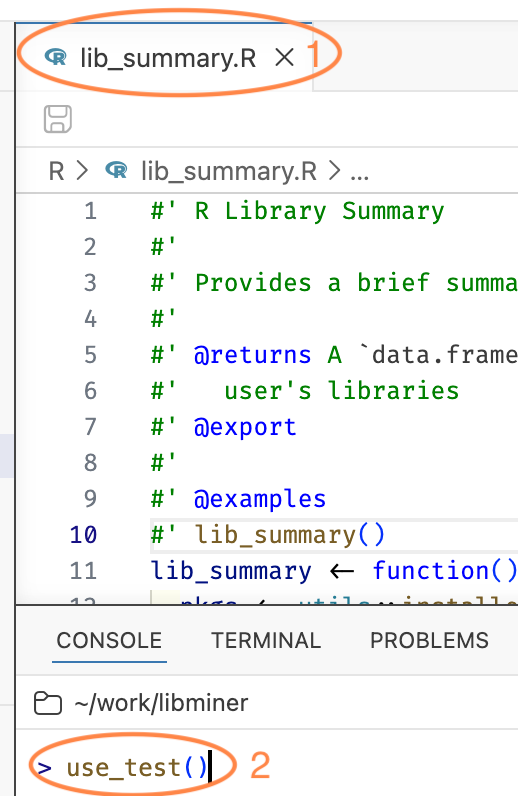
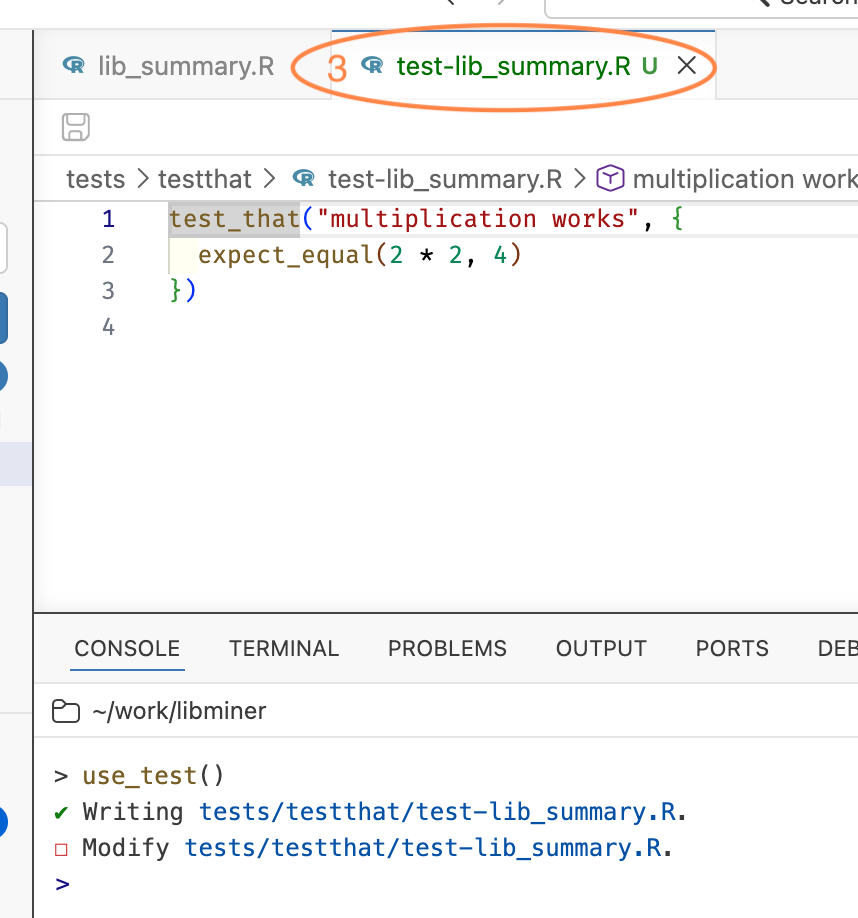
use_r() is the inverse, for jumping back the other way.
Anatomy of a test
- File: one or more related tests, named
test-*.R, mirroringR/ - Test:
test_that("description", { ... }), one unit of functionality - Expectation:
expect_*(), one specific comparison
Failure reports quote the description, so make it informative.
Write a test
Run your tests
- R: Test R Package in Test Explorer in the Command Palette
- Cmd/Ctrl + Shift + T
- or
test()in the console
Positron’s Test Explorer
A tree of your test files and test_that() blocks, with pass and fail marks on each one.
- Run or re-run a single test
- Very handy when you are chasing one failure
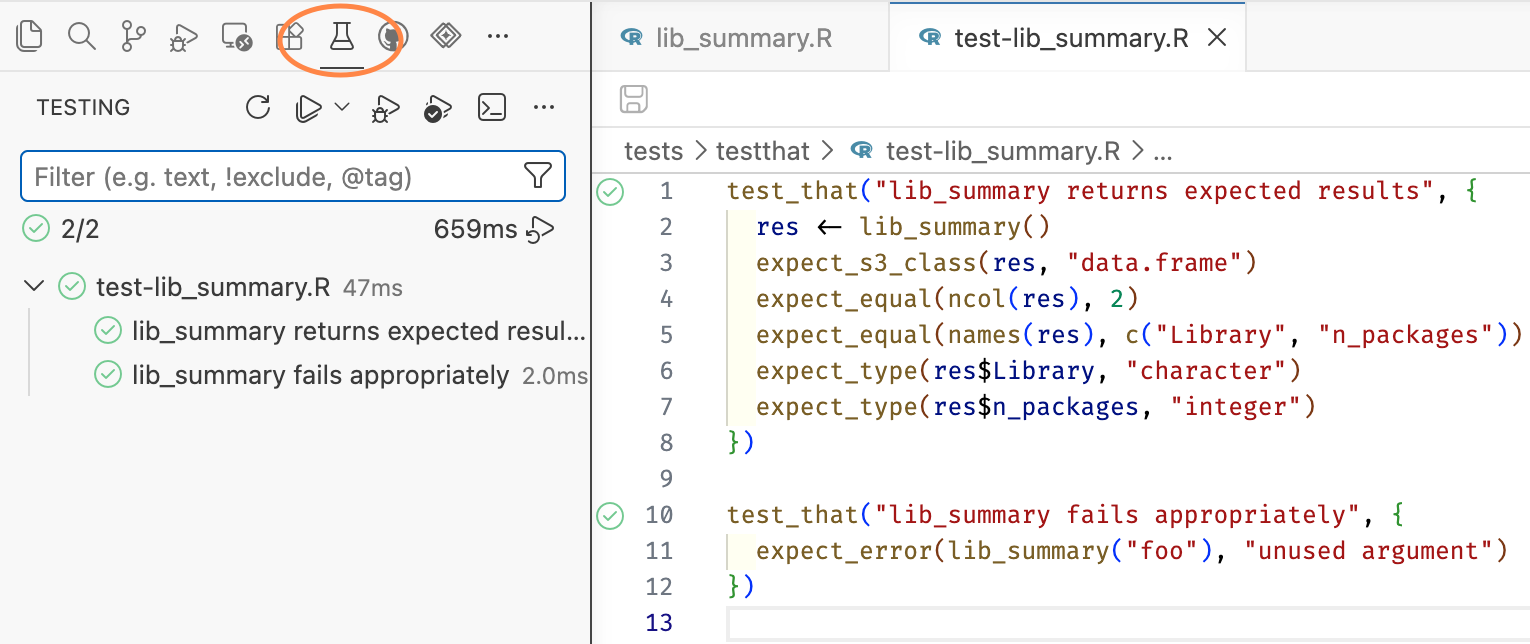
R: Test R Package in Terminal gives you plain console output instead.
Workflow: code plus tests
- Edit code,
load_all(), Cmd/Ctrl + Shift + L - Edit tests,
test(), Cmd/Ctrl + Shift + T - Edit roxygen,
document(), Cmd/Ctrl + Shift + D - Periodically,
check(), Cmd/Ctrl + Shift + E
Your turn
use_testthat()use_test()withR/lib_summary.Ropen- Write a couple of tests and run them
check(), commit, push
Dependencies
Taking on a dependency
Let’s report the on-disk size of each library, using the fs package.
- Every package you use must be declared
- Never call
library()in code belowR/
Depends, Imports, Suggests
- Depends: installed with your package and attached. Rarely what you want
- Imports: installed with your package. The usual choice
- Suggests: not installed automatically. For development, tests, vignettes, or rarely used features
Imports in two files
- Listing a package in
Imports:inDESCRIPTIONdoes not “import” it - A package in
Imports:may, but need not, appear inNAMESPACE - Every package in
NAMESPACEmust be inImports:(orDepends:)
Three ways to call another package’s functions
pkg::fun(), always fine, always explicit#' @importFrom pkg fun1 fun2, for functions you use constantly#' @import pkg, the whole package. Rarely a good idea
We will use pkg::fun().
Use the dependency
lib_summary <- function(sizes = FALSE) {
  pkgs <- utils::installed.packages()
  pkg_tbl <- table(pkgs[, "LibPath"])
  pkg_df <- as.data.frame(pkg_tbl, stringsAsFactors = FALSE)
  names(pkg_df) <- c("Library", "n_packages")

  if (sizes) {
    pkg_df$lib_size <- fs::as_fs_bytes(vapply(
      pkg_df$Library,
      function(x) {
        sum(fs::dir_info(x, recurse = TRUE, type = "file")$size)
      },
      FUN.VALUE = numeric(1)
    ))
  }
  pkg_df
}
Manual test drive
Seems to work!
But the tests disagree
Run the tests and one of them fails. This is the system working as designed.
Update the test, and add one for the new behaviour:
And check() disagrees too
A warning about an undocumented parameter, sizes.
Then document() and check again.
Clean
0 errors ✔ | 0 warnings ✔ | 0 notes ✔Your turn
use_package("fs")- Add the
sizesargument - Fix and extend your tests
- Document
sizes,document(),check() - Commit and push
Continuous integration
use_github_action()
If your code is on GitHub, GitHub Actions can check your package on three operating systems every time you push.
Choose check-standard.
What it writes
.github/workflows/R-CMD-check.yaml- An R-CMD-check badge in
README.Rmd
So re-render the README:
Commit and push
The config has to be on GitHub to take effect.
Admire the badge, and your automatic multi-platform check results.
Your turn
use_github_action()build_readme()check(), commit, push- Watch the checks run on GitHub
A package website
use_pkgdown_github_pages()
Commit and push.
That is all you need to publish a beautiful website for your package.
Assuming that:
- You are using Git
- and GitHub
- and Git and GitHub work smoothly from R
- and the repo is public
- and you remembered to commit and push afterwards
Your turn
use_pkgdown_github_pages()- Commit and push
- Visit the URL in the output and marvel at your handiwork
Release
Getting your package to users
- GitHub: easy for you, harder for users. Comes free with everything we just did. Good for a small, savvy audience
- CRAN: easy for users, harder for you. Binaries, discoverability, ordinary
install.packages(), and stringent requirements
Preparing for CRAN
“If it hurts, do it more often.”
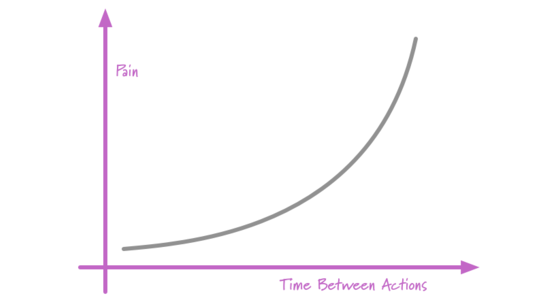
check()often, aiming for zero errors, warnings, and notes- Let GitHub Actions check you on every platform, on every push
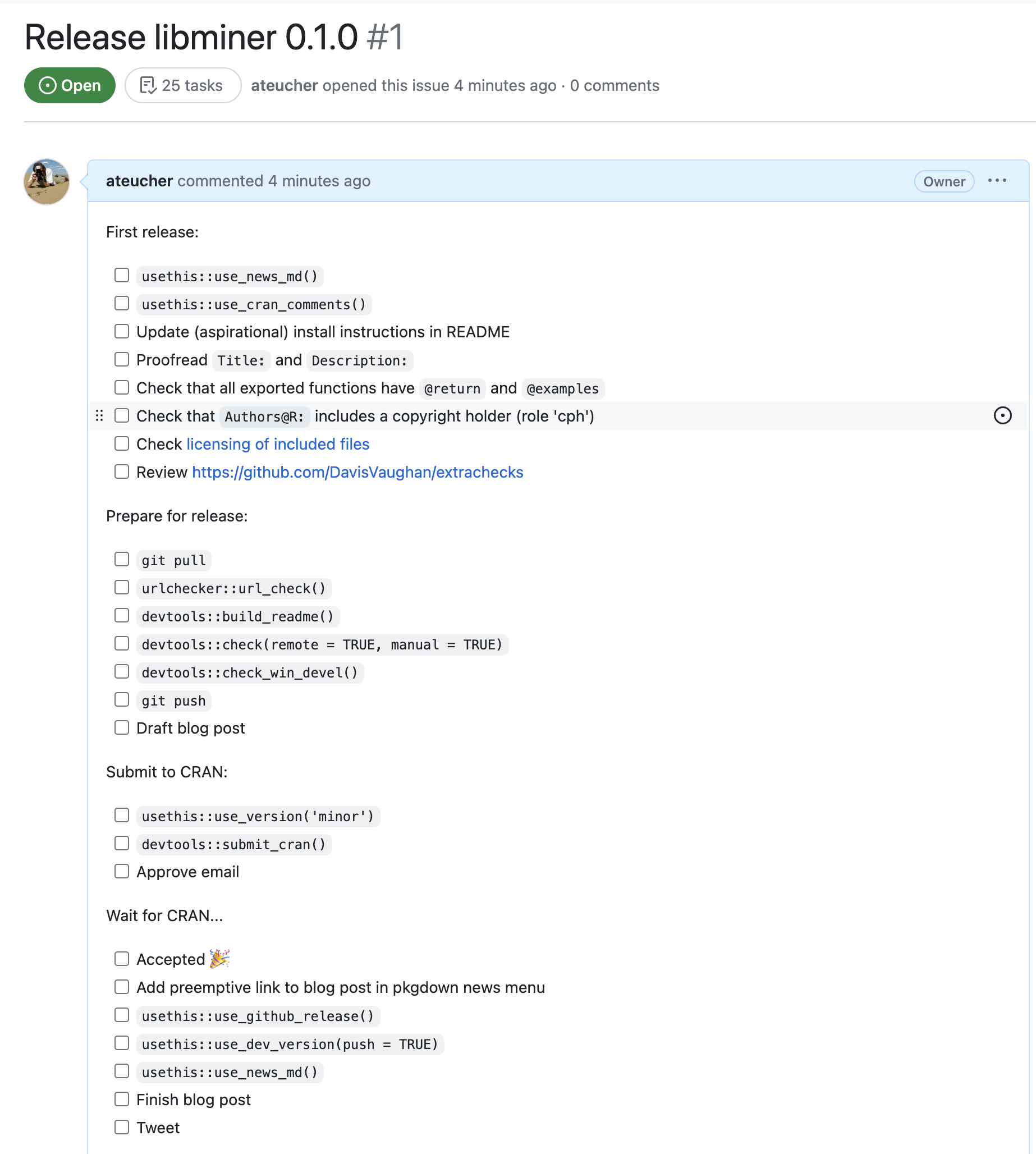
use_release_issue()
Opens a GitHub issue with a checklist for preparing a CRAN release.
Review
Review: functions
Run once
create_package(), use_git(), use_github(), use_devtools(), use_mit_license(), use_testthat(), use_readme_rmd(), use_package_doc(), use_github_action(), use_pkgdown_github_pages(), use_release_issue()
Run periodically
use_r(), use_test(), use_package(), build_readme(), install()
Review: shortcuts
| Function | Positron command | Shortcut |
|---|---|---|
load_all() |
R: Load R Package | Cmd/Ctrl + Shift + L |
document() |
R: Document R Package | Cmd/Ctrl + Shift + D |
test() |
R: Test R Package in Test Explorer | Cmd/Ctrl + Shift + T |
check() |
R: Check R Package | Cmd/Ctrl + Shift + E |
install() |
R: Install R Package and Restart R | Cmd/Ctrl + Shift + B |
Resources
- r-pkgs.org, the book behind this workshop
- happygitwithr.com, for Git and GitHub trouble
- design.tidyverse.org, for function design
- Posit cheatsheets
Thanks!
Workshop site: https://jennybc.github.io/2026_raukr-positron-ai-pkg-dev/
Read next: R Packages (2e)
Gratefully adapted from materials by Andy Teucher for Introduction to R Package Development at posit::conf(2023).